

Event & Party Planner Spreadsheet (Google Sheets & Excel)
Google Sheets + Microsoft Excel · Light & Dark Modes
Party Budget Spreadsheet, Guest RSVP Tracker, Vendor Coordinator & Day-of Timeline
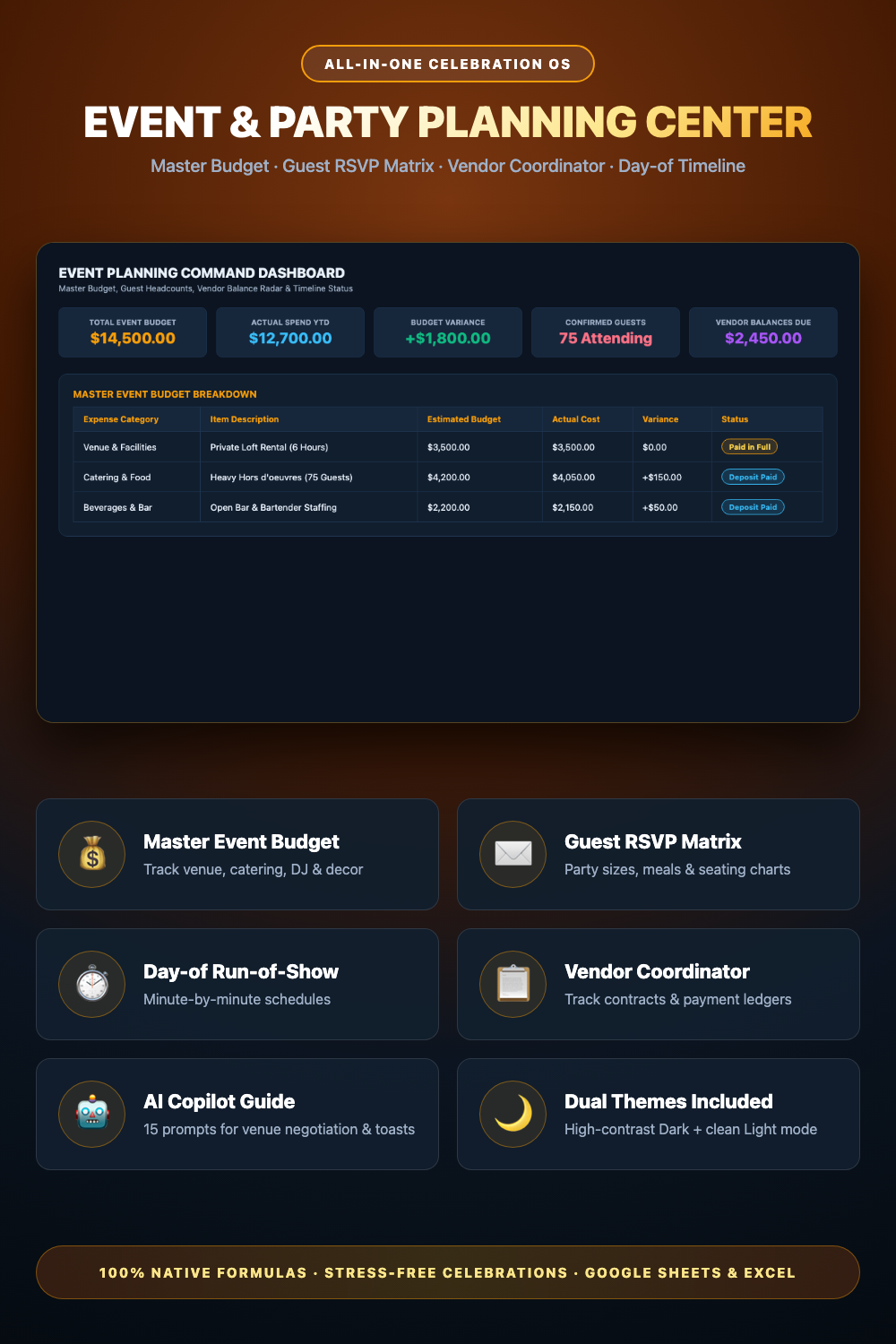
- Event Command Dashboard (Budget totals, actual spend, variance & confirmed guests)
- Master Event Budget (Venue, catering, open bar, DJ, photo, decor & rental tracking)
- Guest List & RSVP Matrix (Party sizes, attendance status, meals & seating assignments)
- Day-of Run-of-Show Timeline (Minute-by-minute schedule from load-in to event strike)
- Companion AI Prompt Pack Included (Venue negotiation, alcohol math & toast scripts)
- Light & Dark Mode Included (Google Sheets + Microsoft Excel)
Instant digital download. All sales final. Message us anytime for help.
Take complete control of your event budget, guest RSVPs, vendor contracts, meal selections, and day-of timelines. The DownloadSuite Event & Party Planning Command Center is an all-in-one celebration operating system engineered specifically for party hosts, event coordinators, milestone celebrations, birthdays, anniversaries, and corporate gatherings.
Stop stressing over runaway catering expenses, unconfirmed guest headcounts, and chaotic day-of vendor schedules. This Google Sheets and Excel system organizes your entire event planning lifecycle — from tracking estimated vs actual costs across 8 expense categories (Venue, Catering, Bar, DJ, Photo, Decor, Rentals) to managing guest party sizes (+1s), meal preferences, table seating charts, vendor payment balances, and minute-by-minute day-of schedules.
What's Included in This System:
- Event Command Dashboard: High-contrast KPI cards for Total Event Budget ($), Actual Spend YTD, Live Budget Variance ($), Confirmed Guest Headcount, and Outstanding Vendor Balances.
- Master Event Budget & Actuals: Itemize estimated vs actual costs across Venue, Catering & Food, Beverages & Bar, Entertainment & DJ, Photography, Decor & Floral, Rentals, and Favors.
- Guest List & RSVP Tracker: Catalog guest names, party sizes (+1s), RSVP statuses (Attending, Declined, Pending), meal preferences, dietary restrictions, and table seating assignments.
- Day-of Run-of-Show Timeline: Minute-by-minute schedule mapping setup, vendor load-in arrival times, cocktail hour, dinner service, toasts, and teardown strike.
- Companion AI Prompt Guide Included: Complete 15-module prompt guide for per-guest budget allocation, venue contract negotiation, alcohol quantity calculations, seating algorithms, and celebration toast writing.
- Light & Dark Mode Included: High-contrast Dark Mode (Celebration Amber & Obsidian) for evening planning plus clean minimalist Light Mode.
How to Use:
- Open the Google Sheets link or native Excel workbook and enter your estimated budget line items in the Event Budget tab.
- Log invited guests, party sizes, and RSVP responses in the Guest List tab to track headcounts and meal counts.
- Build your day-of vendor load-in, dinner, and toast schedule in the Day-of Timeline tab for smooth execution.
What's inside
- Start Here Quick-Start & Event Coordination Guide
- Event Planning Command Dashboard Tab
- Master Event Budget & Actual Expenses Sheet
- Guest List & RSVP Management Matrix Tab
- Day-of Event Run-of-Show Timeline Sheet
- Companion Event Planning & Vendor Strategy AI Prompt Pack (AI_PROMPT_GUIDE.md)
- Instant Google Sheets Copy Links + Native Excel .xlsx Workbooks
FAQ
Can I use this for birthdays, anniversaries, and corporate events?
Yes! The workbook is designed for any type of celebration, milestone birthday, anniversary party, gala, baby shower, or corporate gathering.
Does it calculate per-person food and bar costs?
Yes! The dashboard and budget tabs calculate total spend and link directly to confirmed guest headcounts to show your true cost-per-guest.
Does it work in Excel and Google Sheets?
Yes! Both native Microsoft Excel (.xlsx) workbooks and instant Google Sheets copy links in Light and Dark themes are included.